
rclone: OneDrive, SFTP & Co. unter Linux einrichten
rclone: rsync für Cloud Storage
Obacht! Nicht apt install rclone verwenden, weil alte Version, sondern zum installieren:
sudo -v ; curl https://rclone.org/install.sh | sudo bashEikes cmd mit Datum+Uhrzeit im Logfile + leere Verzeichnisse mitsynchronisieren:
rclone sync onedrive-pl: /mnt/praxis-volume-01/onedrive-pl --log-file /home/onedrive-rclone-sync/log_$(date +'%Y-%m-%d_%H-%M-%S').txt --log-level INFO --create-empty-src-dirs --progress1) onedrive mit rclone konfigurieren
rclone configfür OneDrive folgende Anleitung verwenden:
2) auflisten der dateien mit
# alle ordner in top-level onedrive auflisten
rclone lsd onedrive-pl:

# alle dateien gesamt auflisten (abbrechen mit STRG+C)
rclone ls onedrive-pl:

# alle mit mir geteilten ordner anzeigen
rclone lsf onedrive-pl: --drive-shared-with-me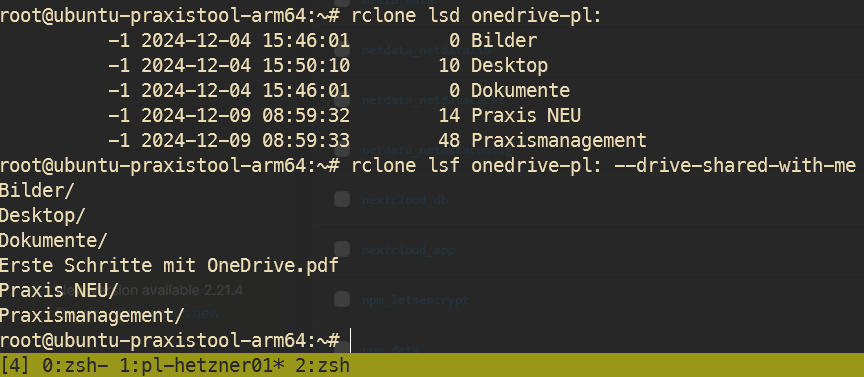
3) synchronisieren zu pfad
rclone sync onedrive-pl: /lokaler/pfad --drive-shared-with-meoder mit Bandbreitenbegrenzung:
rclone sync onedrive-pl: /lokaler/pfad --drive-shared-with-me --bwlimit 10M --progressoder erstmal als dry run (testdurchlauf)
rclone sync onedrive-pl: /lokaler/pfad --drive-shared-with-me --bwlimit 10M --progress --dry-runoder mit logfile
rclone sync onedrive-pl: /lokaler/pfad --drive-shared-with-me --bwlimit 10M --log-file /path/to/log.txt --log-level INFO --progressmounten
rclone mount sftp-remote-01:/ /mnt/rclone-sftp/remote-01 --vfs-cache-mode writes --daemonhttps://rclone.org/commands/rclone_mount/
Troubleshoot
fusermount: user has no write access to mountpoint /data
fusermount3: user has no write access to mountpoint /mnt...
https://github.com/tynor88/docker-rclone-mount/issues/2#issuecomment-470129261
Lösung: chmod 777 /mnt/disks/rclone_volume
VolumeDriver.Mount: failed to mount FUSE fs: fusermount: exec: "fusermount3": executable file not found in $PATH
https://github.com/rclone/rclone/issues/6844#issuecomment-1474183838
Lösung: sudo apt install fuse3
failed to parse private key file: ssh: key is not password protected
Lösung: aktuellste Version von rclone installieren
No comments to display
No comments to display