
GMKTec EVO-X2
128GB RAM + 2TB SSD + Ryzen AI MAX+ 395
Neue Firmware
https://strixhalo.wiki/Hardware/Boards/Sixunited_AXB35/Firmware
BIOS: 1.11 20251017 AXB35-02_GMK_SW1.11_20251017.zip
EC Firmware: 1.08 EC-AXB35-02-1.08.zip
Linksammlung
https://www.reddit.com/r/MiniPCs/comments/1mptl53/gmktec_evox2_amd_ryzen_ai_max_395_minipc_with/
https://www.reddit.com/r/LocalLLaMA/comments/1le951x/gmk_x2amd_max_395_w128gb_first_impressions/
https://www.reddit.com/r/GMKtec/comments/1ldtnbl/new_firmware_for_evox2_bios_105_ec_106/
https://github.com/ollama/ollama/issues/12342 <
https://github.com/ollama/ollama/issues/12062
https://www.reddit.com/r/ollama/comments/1nt5fcr/how_do_i_get_ollama_to_use_the_igpu_on_the_amd_ai/
AMD-Treiber installieren
Mit folgendem Tipp auf
https://www.reddit.com/r/ollama/comments/1nt5fcr/how_do_i_get_ollama_to_use_the_igpu_on_the_amd_ai/
auf folgenden Kommentar gestoßen
https://www.reddit.com/r/ollama/comments/1nt5fcr/comment/ngshfbr/
joseph_sellers
•
2mo ago
I am on a different stack (but same device). I am on Ubuntu 25.04, and using Docker, but I have Ollama working great.I found an AMD APU specific fork of Ollama: https://github.com/rjmalagon/ollama-linux-amd-apu
On that fork, there is an open issue where someone says they have figured out how to get Ollama working on the exact device I am using: https://github.com/rjmalagon/ollama-linux-amd-apu/issues/24
They have created a fork, of the fork, with the fix they found: https://github.com/phueper/ollama-linux-amd-apu
Hopefully there are some clues there to help you get up and running on your setup.
dann auf https://github.com/rjmalagon/ollama-linux-amd-apu?tab=readme-ov-file#check-amount-of-gtt-memory gekommen und folgendes cmd überprüft:
sudo dmesg | grep "amdgpu*"danach ist mir aufgefallen, dass der init der amdgpu nicht geklappt hat:
amdgpu: Fatal error during GPU init
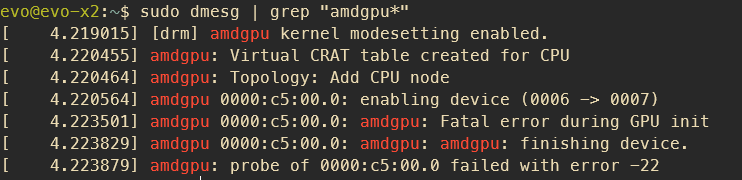
also unter https://www.amd.com/en/support/download/linux-drivers.html aktuellste Treiber für mein Ubuntu 24.04.03 heruntergeladen
sudo -i
wget https://repo.radeon.com/amdgpu-install/30.20.1/ubuntu/noble/amdgpu-install_7.1.1.70101-1_all.deb
chmod +x ./amdgpu-install_7.1.1.70101-1_all.deb
apt install ./amdgpu-install_7.1.1.70101-1_all.deb
amdgpu-install
reboot
danach
sudo dmesg | grep "amdgpu.*memory"
Richtiges Ollama Dockerimage wählen
Für AMD GPUs muss das RCOm Image verwendet werden:
No comments to display
No comments to display