Obacht! Nicht apt install rclone verwenden, weil alte Version, sondern zum installieren:
``` sudo -v ; curl https://rclone.org/install.sh | sudo bash ``` Eikes cmd mit Datum+Uhrzeit im Logfile + leere Verzeichnisse mitsynchronisieren: ``` rclone sync onedrive-pl: /mnt/praxis-volume-01/onedrive-pl --log-file /home/onedrive-rclone-sync/log_$(date +'%Y-%m-%d_%H-%M-%S').txt --log-level INFO --create-empty-src-dirs --progress ``` 1\) onedrive mit rclone konfigurieren ``` rclone config ``` für OneDrive folgende Anleitung verwenden: [https://rclone.org/onedrive/](https://rclone.org/onedrive/) 2\) auflisten der dateien mit ``` # alle ordner in top-level onedrive auflisten rclone lsd onedrive-pl: # alle dateien gesamt auflisten (abbrechen mit STRG+C) rclone ls onedrive-pl: # alle mit mir geteilten ordner anzeigen rclone lsf onedrive-pl: --drive-shared-with-me ``` [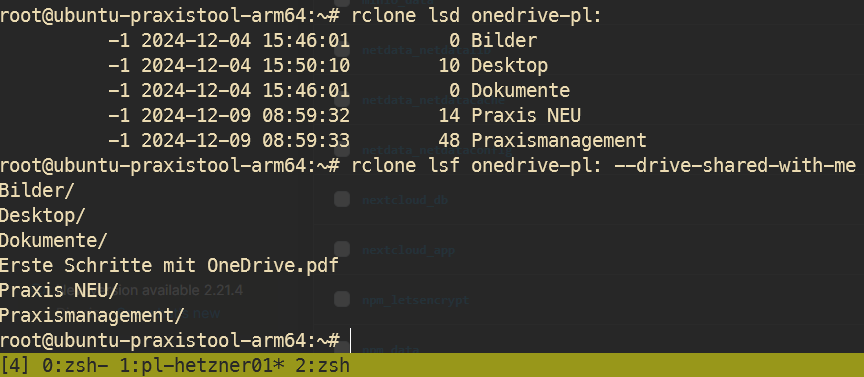](https://wiki.folkerts.it/uploads/images/gallery/2024-12/lAFimage.png) 3\) synchronisieren zu pfad ``` rclone sync onedrive-pl: /lokaler/pfad --drive-shared-with-me ``` oder mit Bandbreitenbegrenzung: ``` rclone sync onedrive-pl: /lokaler/pfad --drive-shared-with-me --bwlimit 10M --progress ``` oder erstmal als dry run (testdurchlauf) ``` rclone sync onedrive-pl: /lokaler/pfad --drive-shared-with-me --bwlimit 10M --progress --dry-run ``` oder mit logfile ``` rclone sync onedrive-pl: /lokaler/pfad --drive-shared-with-me --bwlimit 10M --log-file /path/to/log.txt --log-level INFO --progress ``` ## mounten ``` rclone mount sftp-remote-01:/ /mnt/rclone-sftp/remote-01 --vfs-cache-mode writes --daemon ``` [https://rclone.org/commands/rclone\_mount/](https://rclone.org/commands/rclone_mount/) ## Troubleshoot fusermount: user has no write access to mountpoint /data fusermount3: user has no write access to mountpoint /mnt... [https://github.com/tynor88/docker-rclone-mount/issues/2#issuecomment-470129261](https://github.com/tynor88/docker-rclone-mount/issues/2#issuecomment-470129261) Lösung: `chmod 777 /mnt/disks/rclone_volume` VolumeDriver.Mount: failed to mount FUSE fs: fusermount: exec: "fusermount3": executable file not found in $PATH [https://github.com/rclone/rclone/issues/6844#issuecomment-1474183838](https://github.com/rclone/rclone/issues/6844#issuecomment-1474183838) Lösung: `sudo apt install fuse3` failed to parse private key file: ssh: key is not password protected Lösung: aktuellste Version von rclone installieren