
Dezibelmesser mit ESPHome
https://gist.github.com/peyanski/48691397d4cb1acfc4af56c0232342e2
- ESPHome als Add-On unter Home Assistant installieren
- Add Device unter ESPHome
- Open ESPHome Web - AM BESTEN CHROME VERWENDEN (nicht Brave)
- USB Kabel mit ESP32 oder ESP8266 verbinden
- COM Port auf ESPHome Web auswählen und 'Prepare for first install'
- config in ESPHome editieren:
esphome:
  name: esphome-web-b1157d
  friendly_name: Dezibelmesser

esp8266:
  board: esp01_1m

# Enable logging
logger:

# Enable Home Assistant API
api:
  encryption:
    key: "ePn+9..........9kAnOCQ="

ota:

wifi:
  ssid: !secret wifi_ssid
  password: !secret wifi_password
  use_address: 192.168.178.58
  manual_ip:
    static_ip: 192.168.178.58
    gateway: 192.168.178.1
    subnet: 255.255.255.0

  # Enable fallback hotspot (captive portal) in case wifi connection fails
  ap:
    ssid: "Esphome-Web-B1157D"
    password: "bp1.....Ih"

captive_portal:

web_server:
  port: 80

# https://peyanski.com/diy-smart-sound-sensor-for-home-automation/
# https://gist.github.com/peyanski/48691397d4cb1acfc4af56c0232342e2
globals:

  - id: esphome_sensitivity
    type: float
    initial_value: '36.5'
    restore_value: yes

  - id: esphome_volume
    type: int

sensor:
  - platform: adc
    pin: A0
    id: esphome_db
    device_class: signal_strength
    name: "Db SoundEsp"
    icon: "mdi:volume-vibrate"
    unit_of_measurement: "db"
    update_interval: 2s
    raw: true
    filters:
      - lambda: |-
          unsigned int sample;
          unsigned long startMillis= millis();
          float peakToPeak = 0;
          unsigned int signalMax = 0;
          unsigned int signalMin = 1024;
          while (millis() - startMillis < 500) {
            sample = analogRead(A0);
            if (sample < 1024){
                if (sample > signalMax){
                    signalMax = sample;
                }
                else if (sample < signalMin){
                    signalMin = sample;
                }
              }
          }
          peakToPeak = map((signalMax - signalMin),1,1024,1.5,1024);
          id(esphome_volume) = peakToPeak;
          float state = id(esphome_sensitivity)*log10(peakToPeak)+15;
          return(state);
  - platform: template
    name: "Volume SoundEsp"
    icon: "mdi:volume-high"
    unit_of_measurement: "%"
    update_interval: 2s
    lambda: return(map((id(esphome_db).state),15,150,0,100));

  - platform: template
    name: "RAW SoundEsp"
    icon: "mdi:volume-source"
    unit_of_measurement: "%"
    update_interval: 2s
    lambda: return(map(id(esphome_volume),1,1024,0,100));

number:
  - platform: template
    id: sensitivity_slider
    name: "Sensitivity SoundEsp"
    icon: "mdi:knob"
    update_interval: 5s
    initial_value: "36.5"
    step: 0.1
    min_value: 20
    max_value: 40
    mode: slider
    set_action:
      then:
        - lambda:  id(esphome_sensitivity) = x;
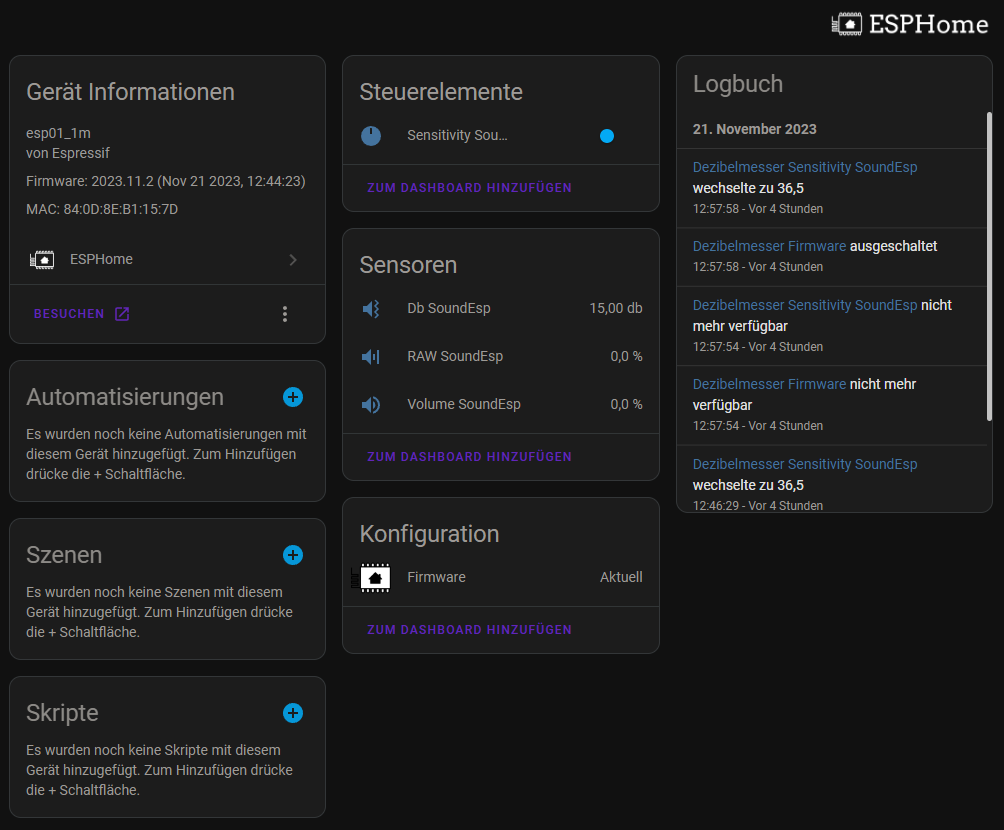
7. In Home Assistant zu Dienste & Geräte gehen und das gefunden ESPHome Gerät (Dezibelmesser) einbinden:
No comments to display
No comments to display