
authentik
https://docs.goauthentik.io/docs/installation/docker-compose
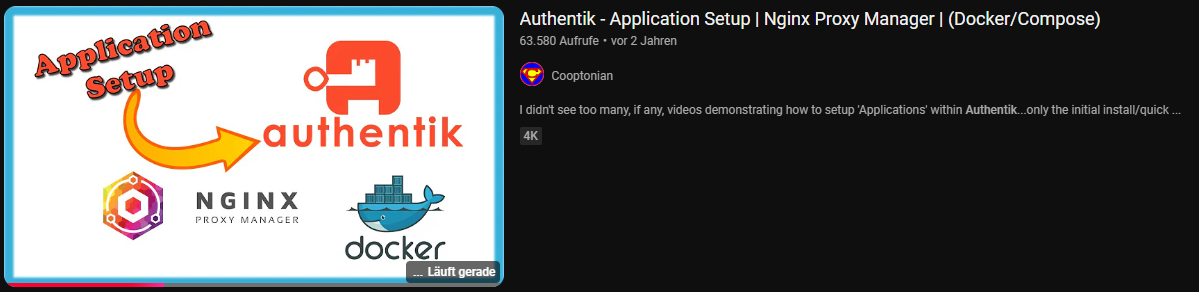
https://www.youtube.com/watch?v=N5unsATNpJk
docker-compose.yml
wichtig:
- bei server einen hostnamen hinzufügen
- wenn möglich port 9000 belassen
- gleiches network wie der Nginx Proxy Manager Container nutzen (damit npm über den hostname auf den authentik server zugreifen kann, siehe 500 Internal Server Error weiter unten)
---

services:
  postgresql:
    image: docker.io/library/postgres:16-alpine
    restart: unless-stopped
    healthcheck:
      test: ["CMD-SHELL", "pg_isready -d $${POSTGRES_DB} -U $${POSTGRES_USER}"]
      start_period: 20s
      interval: 30s
      retries: 5
      timeout: 5s
    networks:
      - reverseproxy_network
    volumes:
      - database:/var/lib/postgresql/data
    environment:
      POSTGRES_PASSWORD: ${PG_PASS}
      POSTGRES_USER: ${PG_USER:-authentik}
      POSTGRES_DB: ${PG_DB:-authentik}
    env_file:
      - stack.env
  redis:
    image: docker.io/library/redis:alpine
    command: --save 60 1 --loglevel warning
    restart: unless-stopped
    healthcheck:
      test: ["CMD-SHELL", "redis-cli ping | grep PONG"]
      start_period: 20s
      interval: 30s
      retries: 5
      timeout: 3s
    networks:
      - reverseproxy_network
    volumes:
      - redis:/data
  server:
    image: ${AUTHENTIK_IMAGE:-ghcr.io/goauthentik/server}:${AUTHENTIK_TAG:-2024.6.0}
    restart: unless-stopped
    hostname: authentik_server
    command: server
    ulimits:
      nofile:
        soft: 10240
        hard: 10240
    environment:
      AUTHENTIK_REDIS__HOST: redis
      AUTHENTIK_POSTGRESQL__HOST: postgresql
      AUTHENTIK_POSTGRESQL__USER: ${PG_USER:-authentik}
      AUTHENTIK_POSTGRESQL__NAME: ${PG_DB:-authentik}
      AUTHENTIK_POSTGRESQL__PASSWORD: ${PG_PASS}
    networks:
      - reverseproxy_network
    volumes:
      - media:/media
      - custom-templates:/templates#
    env_file:
      - stack.env
    ports:
      - "${COMPOSE_PORT_HTTP:-9000}:9000"
      - "${COMPOSE_PORT_HTTPS:-9443}:9443"
    depends_on:
      - postgresql
      - redis
  worker:
    image: ${AUTHENTIK_IMAGE:-ghcr.io/goauthentik/server}:${AUTHENTIK_TAG:-2024.6.0}
    restart: unless-stopped
    command: worker
    ulimits:
      nofile:
        soft: 10240
        hard: 10240
    environment:
      AUTHENTIK_REDIS__HOST: redis
      AUTHENTIK_POSTGRESQL__HOST: postgresql
      AUTHENTIK_POSTGRESQL__USER: ${PG_USER:-authentik}
      AUTHENTIK_POSTGRESQL__NAME: ${PG_DB:-authentik}
      AUTHENTIK_POSTGRESQL__PASSWORD: ${PG_PASS}
    # `user: root` and the docker socket volume are optional.
    # See more for the docker socket integration here:
    # https://goauthentik.io/docs/outposts/integrations/docker
    # Removing `user: root` also prevents the worker from fixing the permissions
    # on the mounted folders, so when removing this make sure the folders have the correct UID/GID
    # (1000:1000 by default)
    user: root
    networks:
      - reverseproxy_network
    volumes:
      - /var/run/docker.sock:/var/run/docker.sock
      - media:/media
      - certs:/certs
      - custom-templates:/templates
    env_file:
      - stack.env
    depends_on:
      - postgresql
      - redis

volumes:
  database:
    driver: local
  redis:
    driver: local
  media:
  custom-templates:
  certs:

networks:
  reverseproxy_network:
      name: reverseproxy_network
      driver: bridge
PG_PASS
openssl rand 36 | base64AUTHENTIK_SECRET_KEY
openssl rand 60 | base64Portainer env via advanced mode
PG_PASS=2jvp8Jmnf8cS
AUTHENTIK_SECRET_KEY="hxHHNgxf5PALhfX0FL69v"
AUTHENTIK_ERROR_REPORTING__ENABLED=true
AUTHENTIK_EMAIL__HOST=smtp.world4you.com
AUTHENTIK_EMAIL__PORT=587
AUTHENTIK_EMAIL__USERNAME=MEINE....@MY-MAIL.DE
AUTHENTIK_EMAIL__PASSWORD=MEIN.....MAIL-PW
AUTHENTIK_EMAIL__FROM=NO-REPLY@MY-MAIL.DE
AUTHENTIK_EMAIL__USE_TLS=true
COMPOSE_PORT_HTTP=9006
COMPOSE_PORT_HTTPS=9446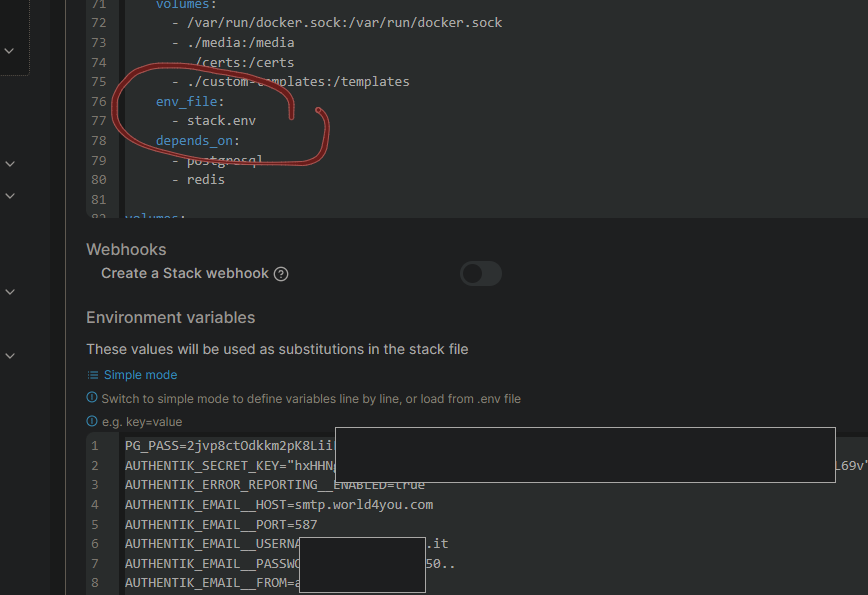
Danach noch das Initial-Setup durchführen, um ein Passwort zu setzen:
http://MEIN-HOSTNAME-ODER-IP:9000/if/flow/initial-setup
oder mit meiner cfg
http://MEIN-HOSTNAME-ODER-IP:9006/if/flow/initial-setup
Zusatzinfo
die Zeilen ulimits: nofile: soft: 10240 hard: 10240
in der docker-compose.yml habe ich eingefügt, weil ein Bug dazu führt, dass die CPU-Leistung des Docker Hosts auf 100% klettert und einige Stunden braucht, bis sie sich wieder erholt. Mehr Infos unter https://github.com/goauthentik/authentik/pull/7762 und
https://github.com/goauthentik/authentik/issues/7025, die Lösung stammt aus diesem Kommentar:
https://github.com/goauthentik/authentik/issues/7025#issuecomment-1868333903
Nextcloud Integration
benötigte Nextcloud App: https://apps.nextcloud.com/apps/user_oidc
Anleitung: https://docs.goauthentik.io/integrations/services/nextcloud/
Zusatz:
Befehl, um nur Anmeldung über Authentik zuzulassen:
sudo -u www-data php var/www/nextcloud/occ config:app:set --value=0 user_oidc allow_multiple_user_backendsbzw wenn man diesem Artikel folgt
docker exec -it -u 33 nextcloud-app-1 /bin/bashund dann
./occ config:app:set --value=0 user_oidc allow_multiple_user_backends
Wenn man sich dann trotzdem über den Direktlogin zb als Super-Admin einloggen möchte, geht das über
http://nextcloud.MEINEDOMAIN.de/login?direct=1
Branding (eigene Marke)
/static/dist/assets/icons/icon_left_brand.svg
/static/dist/assets/icons/icon.png
https://www.youtube.com/watch?v=YawgyM509ng
https://www.youtube.com/watch?v=3oIRY0NWPr8
Proxy Provider
nach Anleitung von https://geekscircuit.com/set-up-authentik-sso-with-nginx-proxy-manager/
Wenn man eine Seite mit Authentik sichern möchte, die kein Userlogin hat (zb gethomepage/homepage dashboard)
https://www.youtube.com/watch?v=Nh1qiqCYDt4
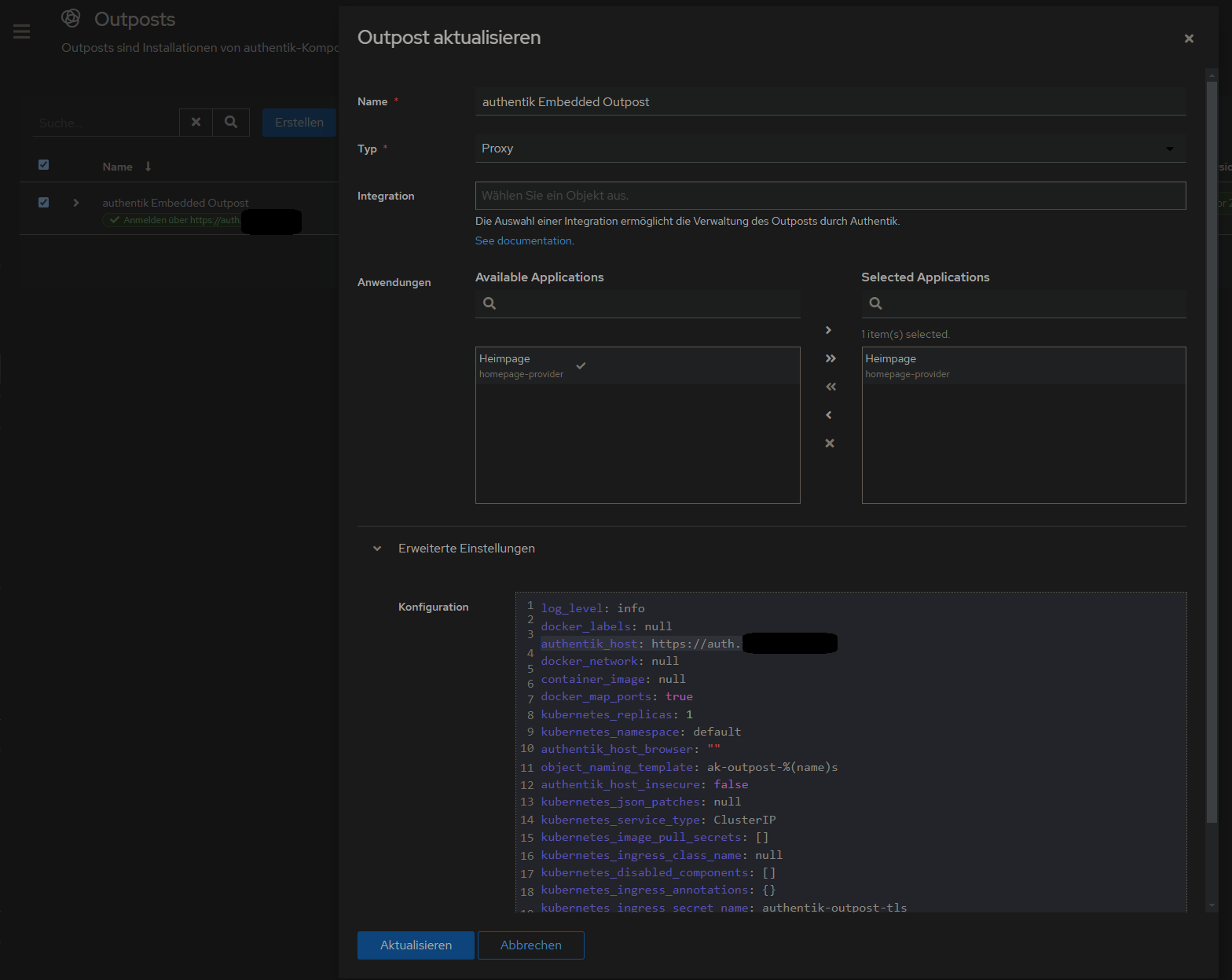
1. Authentik Domain in authentik Embedded Outpost ändern
um die eigene Domain festzulegen. Ist zb wichtig im Falle von Emails und Links, die versendet werden.
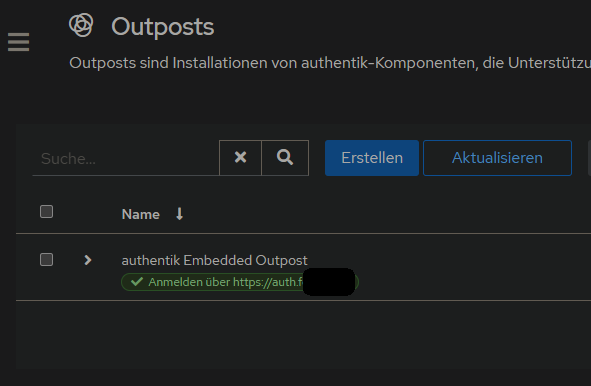
Anwendungen > Outpost > authentik Embedded Outpost > bearbeiten > Erweiterte Einstellungen > Konfiguration > authentik_host auf eigene Domain umstellen:
2. Proxy Provider erstellen
Applications > Provider > new Proxy Provider > Forward Auth (single application) > externer host eingeben
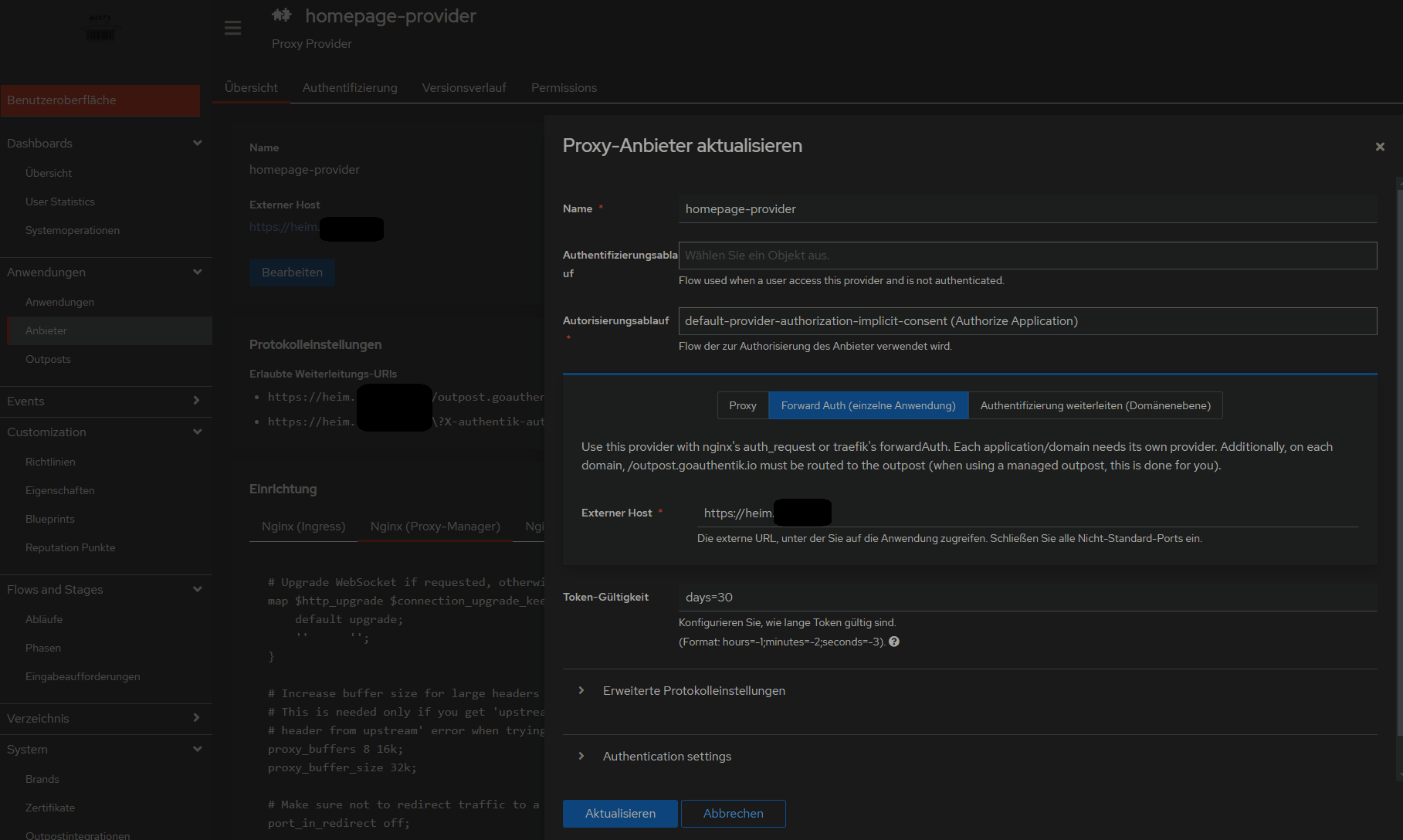
3. Anwendung mit dem erstellten Provider erstellen
...
danach weiter wie beim 500 Internal Server Error vorgehen:vorgehen, also NPM mit custom configuration und alle Container in gleiches Docker-Network legen:
500 Internal Server Error
Lösung auf github gepostet: https://github.com/vineethmn/geekscomments/issues/1#issuecomment-2436487499
#### TLDR:
- add NPM and Authentik to the same docker network
- use the Authentik server dockercontainer INTERNAL Port in NPM > advanced > custom config and not the one you exposed (when you chose to use for example 9006:9000 in your docker-compose.yml then redirect to 9000 anyway. I dont know why 9006 is not working)
#### LDR:
First I added the NPM and Authentik containers in the same docker network and added a hostname in my
authentik docker-compose.yml
...
  server:
    image: ${AUTHENTIK_IMAGE:-ghcr.io/goauthentik/server}:${AUTHENTIK_TAG:-2024.6.0}
    hostname: authentik_server
    ports:
      - 9006:9000
      - 9446:9443
    networks:
      - reverseproxy_network
    volumes:
...
  postgresql:
    image: docker.io/library/postgres:16-alpine
    networks:
      - reverseproxy_network
    volumes:
...

networks:
  reverseproxy_network:
      name: reverseproxy_network
      driver: bridge
and
npm docker-compose.yml
services:
  app:
    image: 'jc21/nginx-proxy-manager:latest'
    restart: always
    ports:
      - '80:80'
      - '81:81'
      - '443:443'
    volumes:
      - data:/data
      - letsencrypt:/etc/letsencrypt
    networks:
      - reverseproxy_network

volumes:
  data:
  letsencrypt:

networks:
  reverseproxy_network:
      name: reverseproxy_network
      driver: bridge
after that i used the NPM > Proxy Host > Advanced > Custom Nginx Configuration config by
https://geekscircuit.com/set-up-authentik-sso-with-nginx-proxy-manager
for my homepage proxy host:
(you only need to change proxy_pass if your authentik-server hostname does not match with mine 'hostname: authentik_server')
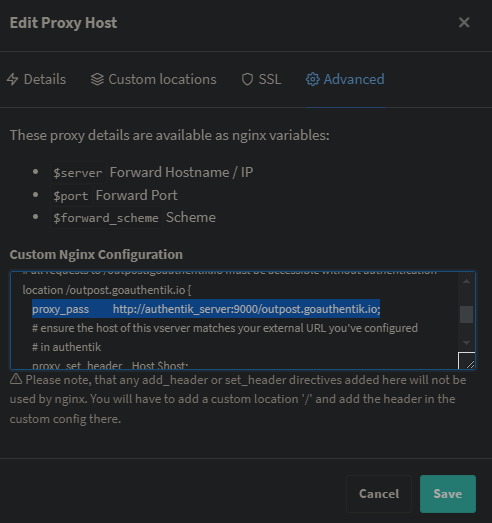
custom nginx configuration
# Increase buffer size for large headers
# This is needed only if you get 'upstream sent too big header while reading response
# header from upstream' error when trying to access an application protected by goauthentik
proxy_buffers 8 16k;
proxy_buffer_size 32k;

location / {
    # Put your proxy_pass to your application here
    proxy_pass          $forward_scheme://$server:$port;

    # authentik-specific config
    auth_request        /outpost.goauthentik.io/auth/nginx;
    error_page          401 = @goauthentik_proxy_signin;
    auth_request_set $auth_cookie $upstream_http_set_cookie;
    add_header Set-Cookie $auth_cookie;

    # translate headers from the outposts back to the actual upstream
    auth_request_set $authentik_username $upstream_http_x_authentik_username;
    auth_request_set $authentik_groups $upstream_http_x_authentik_groups;
    auth_request_set $authentik_email $upstream_http_x_authentik_email;
    auth_request_set $authentik_name $upstream_http_x_authentik_name;
    auth_request_set $authentik_uid $upstream_http_x_authentik_uid;

    proxy_set_header X-authentik-username $authentik_username;
    proxy_set_header X-authentik-groups $authentik_groups;
    proxy_set_header X-authentik-email $authentik_email;
    proxy_set_header X-authentik-name $authentik_name;
    proxy_set_header X-authentik-uid $authentik_uid;
}

# all requests to /outpost.goauthentik.io must be accessible without authentication
location /outpost.goauthentik.io {
    proxy_pass          http://authentik_server:9000/outpost.goauthentik.io; # <<<< CHANGE HERE <<<<
    # ensure the host of this vserver matches your external URL you've configured
    # in authentik
    proxy_set_header    Host $host;
    proxy_set_header    X-Original-URL $scheme://$http_host$request_uri;
    add_header          Set-Cookie $auth_cookie;
    auth_request_set    $auth_cookie $upstream_http_set_cookie;

    # required for POST requests to work
    proxy_pass_request_body off;
    proxy_set_header Content-Length "";
}

# Special location for when the /auth endpoint returns a 401,
# redirect to the /start URL which initiates SSO
location @goauthentik_proxy_signin {
    internal;
    add_header Set-Cookie $auth_cookie;
    return 302 /outpost.goauthentik.io/start?rd=$request_uri;
    # For domain level, use the below error_page to redirect to your authentik server with the full redirect path
    # return 302 https://authentik.company/outpost.goauthentik.io/start?rd=$scheme://$http_host$request_uri;
}
i also did not have to change anything on my authentik outpost:
Andere mit dem gleichen Problem:
https://geekscircuit.com/set-up-authentik-sso-with-nginx-proxy-manager/
https://github.com/goauthentik/authentik/issues/10010
https://www.reddit.com/r/selfhosted/comments/vs12ug/sso_with_authentik_and_nginx_proxy_manager/?tl=de
https://www.youtube.com/watch?v=Nh1qiqCYDt4&list=PLH73rprBo7vSkDq-hAuXOoXx2es-1ExOP