
TruenNAS NFS-Volume für Container
TrueNAS NFS Freigabe
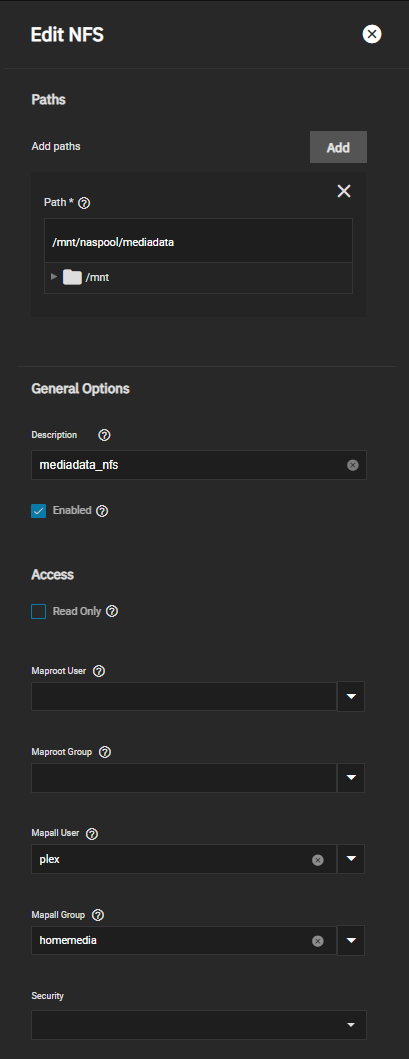
NFS-Freigabe in Truenas aktivieren
- Dienst aktivieren
- NFS-Version V4 wählen (default: V3) > System Settings > Services > NFS > Configure
Für Plex Container:
- Mapall User + Mapall Group zuordnen
- docker-compose file siehe unten
Für Ubuntu VM:
- Maproot User + Group, z,B. "root", zuordnen (UID/GID müssen in identisch sein für TrueNAS und VM)
- Ggfls. Kernel-Modul installieren:
sudo apt-get install nfs-common - Mount-Befehl:
sudo mount -t nfs -o rw 192.168.178.201:/mnt/naspool/mediadata_nfs /mnt/mediadata
Docker-compose File:
---
version: "2.1"
services:
  plex:
    image: ...
    ...
    volumes:
      - mediadata_nfs:/mnt/mediadata_nfs

volumes:
  mediadata_nfs:
    driver: local
    driver_opts:
      type: "nfs"
      o: "addr=192.168.178.201,nolock,soft,rw"
      device: ":/mnt/naspool/mediadata"
Options "o" für NFS-Einbindung -> https://blog.stefandroid.com/2021/03/03/mount-nfs-share-in-docker-compose.html
nfsvers=3ornfsvers=4nolock(optional): remote applications on the NFS server are not affected by lock files within the Docker container (only other processes within the container are affected by locks)soft(optional): the NFS client fails an NFS request afterretrans=nunsuccessful retries, otherwise it will try indefinitelyretrans=n(optional, default 2): specify the number of retries for NFS requests, only relevant if usingsofttimeo=n(optional, default 600): the NFS client waitsntenths of a second before retrying an NFS requestrw: read-write accessro: read only
No comments to display
No comments to display