
input.conf
https://wiki.hypr.land/Configuring/Variables/#input
https://learn.omacom.io/2/the-omarchy-manual/67/faq#how-do-i-switch-between-keyboard-layouts
https://learn.omacom.io/2/the-omarchy-manual/78/keyboard-mouse-trackpad
Tastaturlayout: US-International für QWERTY aber trotzdem Umlaute zb mit
AltGr+Z = Ü
AltGr+Q = Ä
AltGr+P = Ö
https://de.wikipedia.org/wiki/Tastaturbelegung_US-International
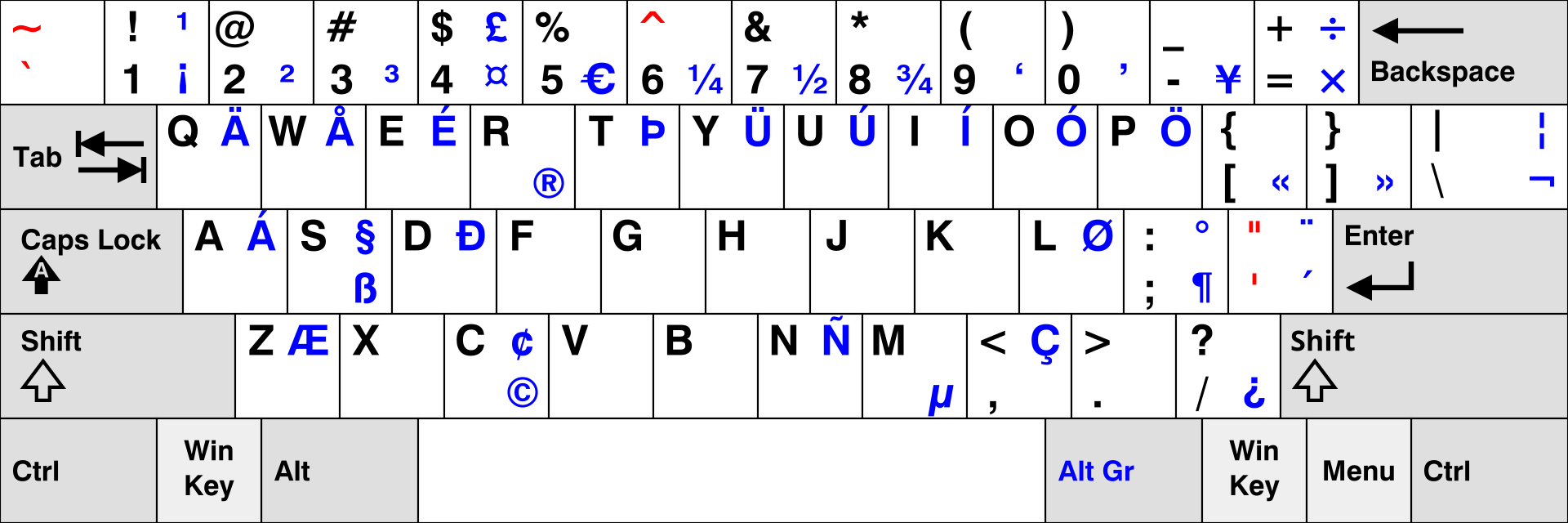
In omarchy Win+Alt+Leertaste > Setup > Input
oder
nvim .config/hypr/input.conf
# Control your input devices
# See https://wiki.hypr.land/Configuring/Variables/#input
input {
  # Use multiple keyboard layouts and switch between them with Left Alt + Right Alt
  # kb_layout = us,dk,eu
  kb_layout = us
  kb_variant = intl
  kb_options = compose:caps # ,grp:alts_toggle

  # Change speed of keyboard repeat
  repeat_rate = 40
  repeat_delay = 250

  # Start with numlock on by default
  numlock_by_default = true

  # Increase sensitivity for mouse/trackpad (default: 0)
  # sensitivity = 0.35

  touchpad {
    # Use natural (inverse) scrolling
    # natural_scroll = true

    # Use two-finger clicks for right-click instead of lower-right corner
    # clickfinger_behavior = true

    # Control the speed of your scrolling
    scroll_factor = 0.4

    # Enable the touchpad while typing
    # disable_while_typing = false

    # Left-click-and-drag with three fingers
    # drag_3fg = 1
  }
}

# Scroll nicely in the terminal
windowrule = match:class (Alacritty|kitty), scroll_touchpad 1.5
windowrule = match:class com.mitchellh.ghostty, scroll_touchpad 0.2

# Enable touchpad gestures for changing workspaces
# See https://wiki.hyprland.org/Configuring/Gestures/
# gesture = 3, horizontal, workspace