scanservjs (Scanner Web-UI)
version: "3.8"

services:
  scanservjs:
    image: sbs20/scanservjs:v3.0.4
    container_name: scanservjs
    privileged: true
    #network_mode: host #BENOETIGT BEIM SUCHEN MIT 'airscan-discover fuer eSCL und WSD Scanner'
    ports:
      - "8098:8080"
    environment:
      #DELIMITER: '|'
      #SANED_NET_HOSTS: "10.0.100.30;10.0.100.31"
      #AIRSCAN_DEVICES: '"HWS PM1 ✳️⚫" = "http://192.168.200.18/eSCL"|"HWS PM2 ✳️⚫" = "http://192.168.200.15/eSCL"|"HWS 1.OG ✳️🎨" = "http://192.168.200.119/eSCL"'
      #AIRSCAN_DEVICES='"Canon MFD" = "http://192.168.0.10/eSCL";"EPSON MFD" = "http://192.168.0.11/eSCL"'
      #AIRSCAN_DEVICES: |
      #  "Canon MFD" = "http://192.168.0.10/eSCL";
      #  "EPSON MFD" = "http://192.168.0.11/eSCL"
      #PIXMA_HOSTS: "192.168.200.33"
      #SCANIMAGE_LIST_IGNORE: "true"
      #DEVICES: "net:10.0.100.30:plustek:libusb:001:003;net:10.0.100.31:plustek:libusb:001:003;airscan:e0:Canon TR8500 series;airscan:e1:EPSON Cool Series"
      OCR_LANG: "deu+eng"
    volumes:
      - /var/run/dbus:/var/run/dbus
      - scans:/var/lib/scanservjs/output
      - cfg:/etc/scanservjs
      - saned:/etc/sane.d
    restart: unless-stopped

volumes:
  scans:
  cfg:
  saned:
Problem: Es werden immer nur die ersten Trennzeichen erkannt, das heißt Scanner PM2 und 1.OG fallen unter ein Device, siehe Log:
# Insert airscan devices
if [ ! -z "$AIRSCAN_DEVICES" ]; then
  devices=$(echo $AIRSCAN_DEVICES | sed "s/$DELIMITER/\n/")
  for device in $devices; do
    sed -i "/^\[devices\]/a $device" /etc/sane.d/airscan.conf
  done
fi
+ [ ! -z "HWS PM1 ✳️⚫" = "http://192.168.200.18/eSCL"|"HWS PM2 ✳️⚫" = "http://192.168.200.15/eSCL"|"HWS 1.OG ✳️🎨" = "http://192.168.200.119/eSCL" ]
+ echo "HWS PM1 ✳️⚫" = "http://192.168.200.18/eSCL"|"HWS PM2 ✳️⚫" = "http://192.168.200.15/eSCL"|"HWS 1.OG ✳️🎨" = "http://192.168.200.119/eSCL"
+ sed s/|/\n/
+ devices="HWS PM1 ✳️⚫" = "http://192.168.200.18/eSCL"
"HWS PM2 ✳️⚫" = "http://192.168.200.15/eSCL"|"HWS 1.OG ✳️🎨" = "http://192.168.200.119/eSCL"
+ sed -i /^\[devices\]/a "HWS PM1 ✳️⚫" = "http://192.168.200.18/eSCL" /etc/sane.d/airscan.conf
+ sed -i /^\[devices\]/a "HWS PM2 ✳️⚫" = "http://192.168.200.15/eSCL"|"HWS 1.OG ✳️🎨" = "http://192.168.200.119/eSCL" /etc/sane.d/airscan.conf
# Insert pixma hosts
if [ ! -z "$PIXMA_HOSTS" ]; then
  hosts=$(echo $PIXMA_HOSTS | sed "s/$DELIMITER/\n/")
  for host in $hosts; do
    echo "bjnp://$host" >> /etc/sane.d/pixma.conf
Lösung: wie oben im docker-compose, den Ordner /etc/sane.d als Volume mounten und die airscan.conf darin per Hand bearbeiten:
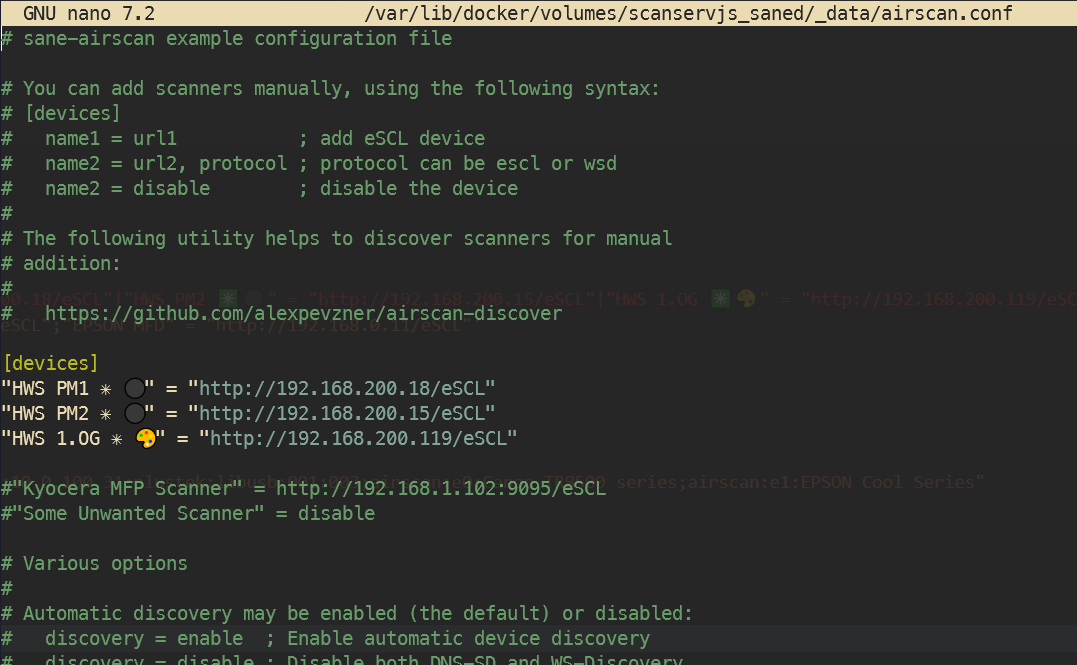
>
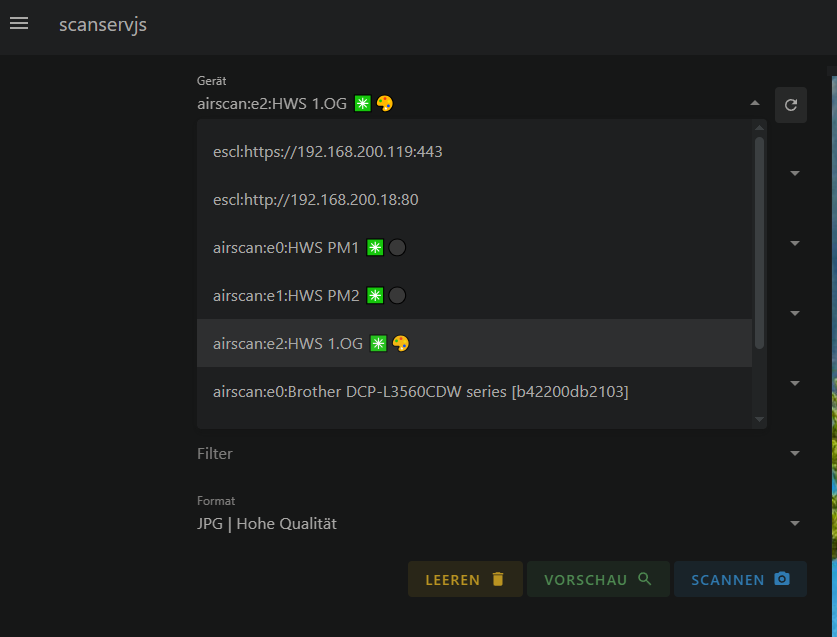
WSD-Scanner suchen
In Docker Container execen und
airscan-discoverausfuehren.
ACHTUNG! Zum discovern eines zb Canon Pixma GM4050 bzw GM4000 series muss network_mode: host im docker-compose.yml aktiviert sein. Danach funktioniert das scannen aber auch ohne network_mode: host
[...]
    container_name: scanservjs
    privileged: true
    network_mode: host
    ports:
[...]
> airscan-discover
[devices]
Brother DCP-L3560CDW series [b42200db2103] = http://192.168.200.34:80/eSCL/, eSCL
Brother DCP-L3560CDW series [b42200db2103] = https://192.168.200.34:443/eSCL/, eSCL
Brother DCP-L3560CDW series [b42200db2103] = http://192.168.200.34:80/WebServices/ScannerService, WSD
Brother DCP-L3560CDW series [b42200db2103] = http://[FE80::7697:79FF:FEEA:4635%252]:80/WebServices/ScannerService, WSD
Brother MFC-L2710DW series = http://192.168.200.32:80/eSCL/, eSCL
Brother MFC-L2710DW series = http://192.168.200.32:80/WebServices/ScannerService, WSD
Brother MFC-L2710DW series = http://[FE80::4ED5:77FF:FE6D:67EF%252]:80/WebServices/ScannerService, WSD
Brother MFC-L2750DW series = http://192.168.200.30:80/eSCL/, eSCL
Brother MFC-L2750DW series = http://192.168.200.30:80/WebServices/ScannerService, WSD
Brother MFC-L2750DW series = http://[FE80::BEF4:D4FF:FE44:75D%252]:80/WebServices/ScannerService, WSD
CANON INC. GM4000 series = http://192.168.200.33:80/wsd/scanservice.cgi, WSD
CANON INC. GM4000 series = http://[fe80::6e3c:7cff:fe0e:c3da%252]:80/wsd/scanservice.cgi, WSD
CANON INC. GM4000 series = http://192.168.200.31:80/wsd/scanservice.cgi, WSD
CANON INC. GM4000 series = http://[fe80::6e3c:7cff:fe0f:db71%252]:80/wsd/scanservice.cgi, WSD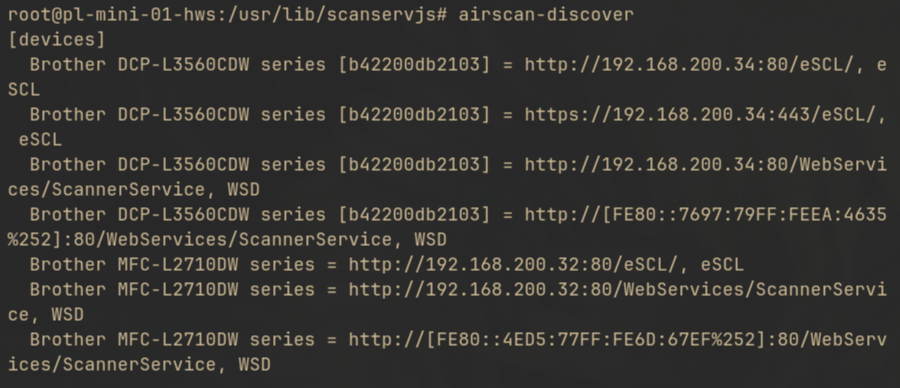
danach die sane.d/airscan.conf anpassen:
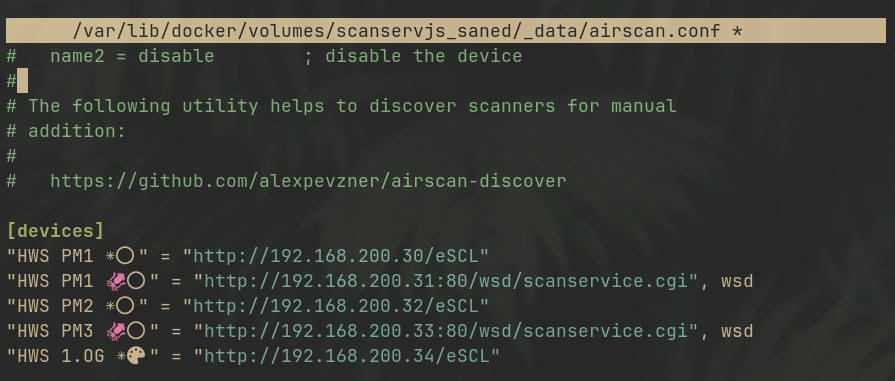
und
scanimage -Leingeben:
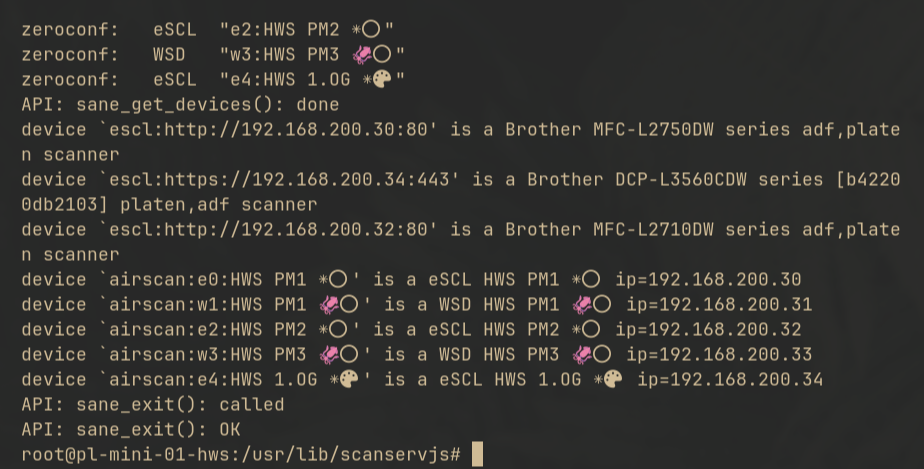
config anpassen und in config.local.js umbenennen:
module.exports = {
  afterDevices(devices) {
 const deviceNames = {
      /*
        'device id':'device name'
      */
      'airscan:e0:Hp Envy Pro 6442': 'Hp Envy Pro 6442'
    };

/*
  replace the id in the filter
*/
 devices
      .filter(d => d.id == 'airscan:e0:Hp Envy Pro 6442')
      .forEach(device => {
        device.features['--resolution'].default = 400;
        device.features['--resolution'].options = [100, 150, 200, 300, 400, 600];
        /*
          Disable batch modes if they are not available on your printer
        */
         device.settings.batchMode.options = ['none', 'manual'];
         /*
         Specify the default pipeline
         */
         device.settings.pipeline.default = ['PNG'];
      });

  devices
      .filter(d => d.id in deviceNames)
      .forEach(d => d.name = deviceNames[d.id]);
  }
};
oder Eikes Beispiel:
[...]
  afterDevices(devices) {
    const deviceNames = {
      /*
        'device id':'device name'
      */
      'airscan:e0:HWS PM1 ✳️⚫': 'HWS PM1  ✳️⚫',
      'airscan:w1:HWS PM1 🦑⚫': 'HWS PM1 🦑⚫',
      'airscan:e2:HWS PM2 ✳️⚫': 'HWS PM2 ✳️⚫',
      'airscan:w3:HWS PM3 🦑⚫': 'HWS PM3 🦑⚫',
      'airscan:e4:HWS 1.OG ✳️⚫🔵🔴🟡': 'HWS 1.OG ✳️⚫🔵🔴🟡'
    };

    devices
      .filter(d => d.id in deviceNames)
      .forEach(d => d.name = deviceNames[d.id]);

    devices
      .filter(d => d.id.includes('PM3 🦑⚫'))
      .forEach(device => {
        device.features['--mode'].default = 'Color';
        device.features['--resolution'].default = 150;
        device.features['--resolution'].options = [75, 150, 300, 600];
        device.features['--brightness'].default = 0;
        device.features['--contrast'].default = 5;
        device.features['-x'].default = 192;
        device.features['-y'].default = 272;
        /* device.settings.pipeline.default = 'PNG'; */
        device.settings.pipeline.default = '@:pipeline.ocr | PDF (JPG | @:pipeline.high-quality)';
    });
  },

  async afterScan(fileInfo) {
[...]
https://medium.com/@davidclaeys/scanservjs-make-your-own-scan-server-21539f64265c
escl:// automatische Suche deaktivieren
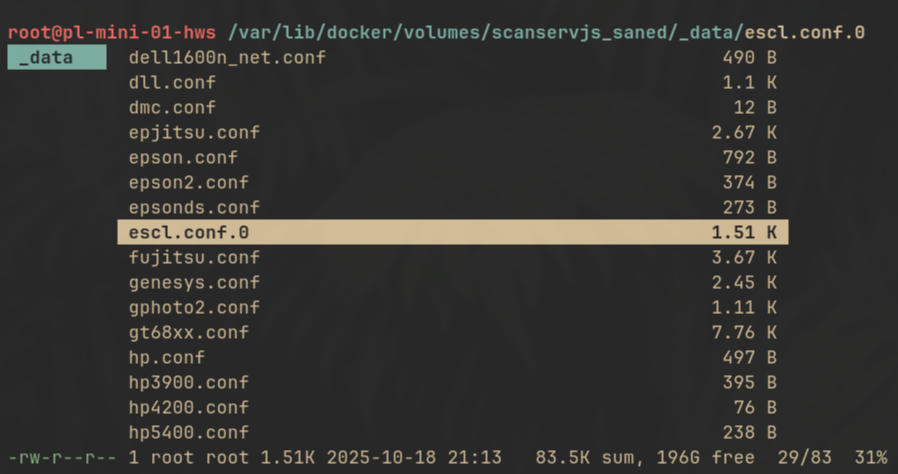
escl.conf umbenennen: