CUPS Druckerdienst
https://hub.docker.com/r/anujdatar/cups
https://github.com/anujdatar/cups-docker
services:
    cups:
        image: anujdatar/cups:25.08.01
        container_name: cups
        restart: unless-stopped
        ports:
            - "631:631"
        devices:
            - /dev/bus/usb:/dev/bus/usb
        environment:
            - CUPSADMIN=admin
            - CUPSPASSWORD=MEINE-PASSWORT
            - TZ="Europe/Berlin"
        volumes:
            - app:/etc/cups

volumes:
  app:
Falls Port 631 vom System already in use
sudo systemctl stop cups
sudo systemctl disable cups

sudo systemctl stop cups-browsed
sudo systemctl disable cups-browsed

sudo apt remove cups
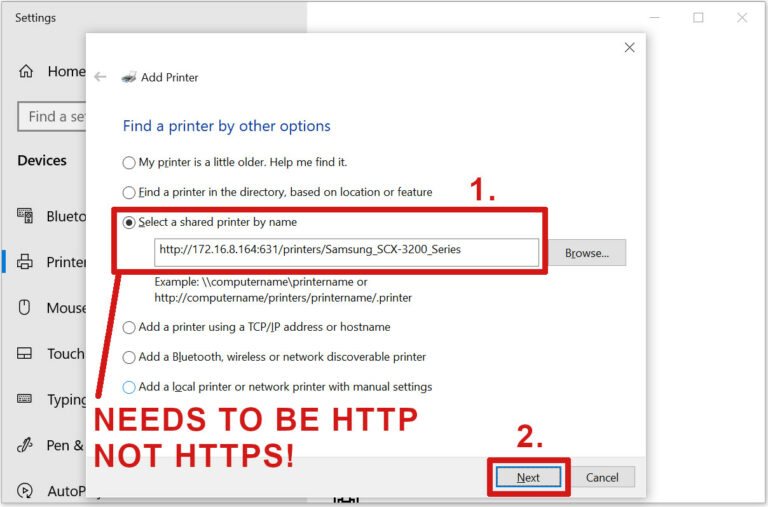
Mit CUPS verbundenen Drucker in Windows einfügen